Technology vocabulary: Learn words that relate to technology
Contents

Learning the language of technology can seem daunting, especially when new terms pop up almost daily. If you’re balancing work, studies, and daily life, English learning for busy schedules can help you stay consistent without feeling overwhelmed. This article will guide you through some essential technological equipment and terms with their meanings, and provide context to help you understand and remember them.
Why Technology Vocabulary Keeps Growing
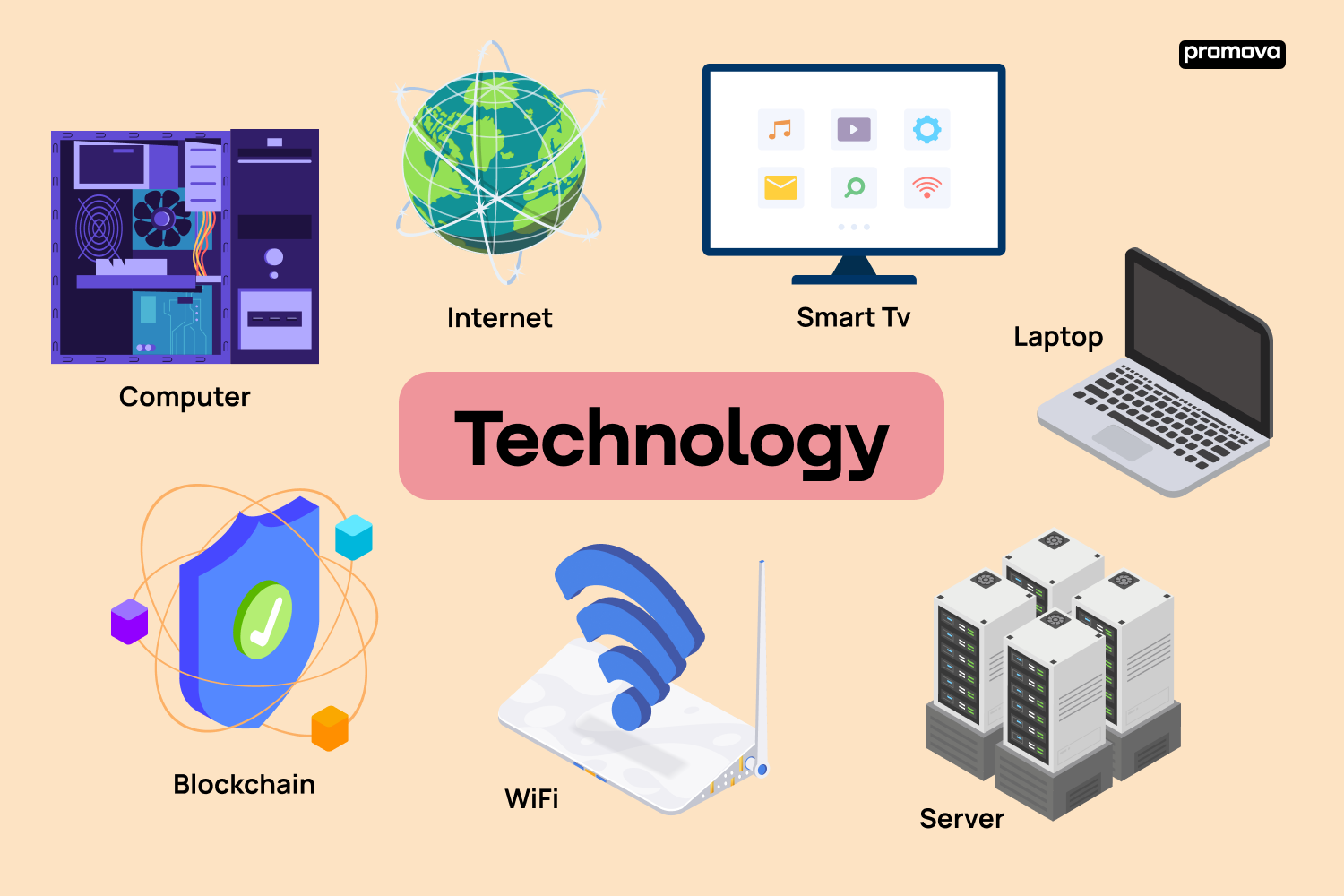
Technology evolves fast — and language follows. Words like computer, internet, and email once sounded futuristic, but today they feel basic. As new tools appear, new terms emerge, old ones change meaning, and some disappear. Understanding tech vocabulary helps you stay confident in conversations, work tasks, and daily digital life.
Basics of Technology Vocabulary
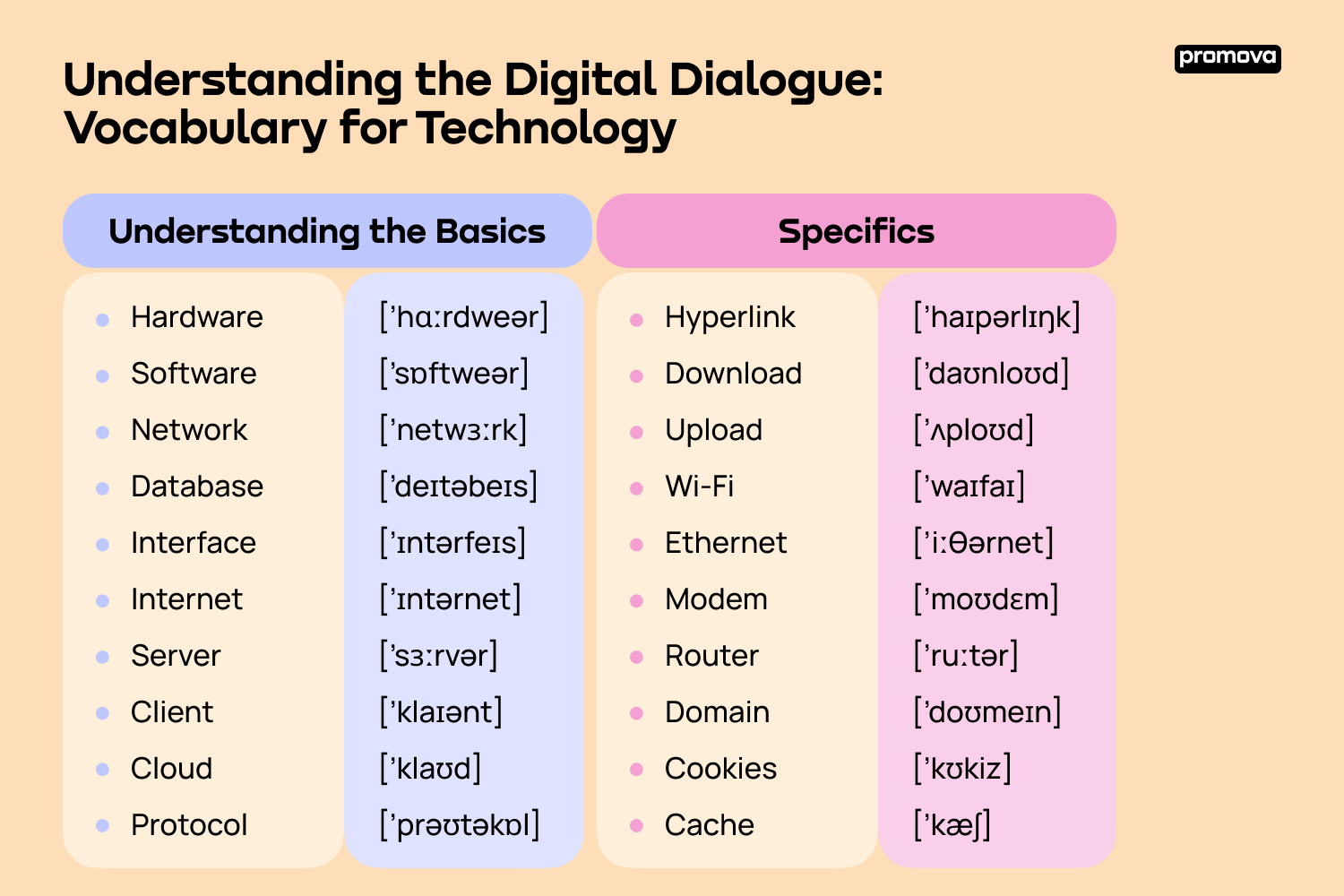
Before diving into the deep end, let's start with some foundational technological vocabulary. These are examples of technological tools you might come across daily, and having a firm grasp on these will set you on the right path.
- Computer: a device that can be programmed to carry out arithmetic or logical operations.
- Internet: a worldwide network of computers and systems that can share and send information.
- Software: the programs and other information that a computer needs to run.
- Hardware: the computer's actual parts, like the CPU, monitor, and keyboard.
- Digital: recording and processing information with two signs - 0 and 1.
- Analog: a type of signal that keeps going, while digital signals stop and start.
- Processor: the component in a computer that interprets instructions and processes data in computer programs.
- URL (Uniform Resource Locator): the address used to access a particular website on the Internet.
- Operating System: software that communicates with computer hardware and allows other software to run.
- Peripheral: an external device connected to a computer, like a mouse or a printer.
These basic terms form the core of almost every tech conversation. Once you understand how hardware, software, networks, and data connect, it becomes much easier to learn advanced technology vocabulary later.
Technological Devices
In today's age of innovation and technological advancement, devices and gadgets have become essential components of our daily lives. From enhancing our productivity to providing entertainment and convenience, this technological equipment shapes the way we work, communicate, and relax. Knowing the diverse range of technological devices will help you understand their functionality and relevance in different scenarios.
- Smartphone: a mobile device that combines cellular and computing functions.
- Tablet: a flat, portable computer that's touchscreen operated.
- Laptop: a portable computer that folds open to expose a screen and keyboard.
- Desktop Computer: a personal computer designed to fit comfortably on top of a desk.
- Smartwatch: a wearable computing device that closely resembles a wristwatch.
- E-reader: a mobile device for reading content, like e-books and newspapers.
- Game Console: an electronic device for playing video games.
- VR Headset: a head-mounted device that provides virtual reality experiences.
- Drone: a remote-controlled flying device, often equipped with a camera.
- Smart Speaker: a speaker that can stream music, answer questions, and control smart home devices using voice commands.
- Wearable Fitness Tracker: a device typically worn on the wrist that tracks physical activity and health metrics.
- Digital Camera: a camera that captures photographs in digital format.
- Action Camera: a compact camera designed for recording action while being immersed in it.
- Smart TV: a television set with integrated Internet capabilities.
- Home Assistant Hub: a centralized technological device that integrates and controls various smart home products.
The world is buzzing with technological equipment, each designed to cater to specific needs and enhance certain aspects of our lives. From professional tasks to recreational activities, these technological devices offer seamless functionality, changing our daily routines. As we continue to embrace the digital era, familiarizing ourselves with these technological devices is crucial to maximizing their potential and staying updated.
5
Advanced Technology Vocabulary
As you delve deeper into technology items, you'll encounter more specific terms. These words may sound foreign initially, but with understanding, they'll become part of your daily vocabulary.
- Algorithm: a set of rules to solve a problem in a series of steps.
- Byte: a group of binary digits operated on as a unit and is typically eight bits long.
- Cache: a piece of hardware or software that saves data so that it can be used faster for future calls.
- Domain: a separate part of the Internet whose names all end with the same letter.
- Firewall: a network security system that controls and monitors incoming and outgoing network traffic.
- Data Mining: the process of analyzing large sets of data to discover patterns and trends.
- Virtual Reality (VR): a computer-simulated experience that replicates an environment and can simulate physical presence.
- Blockchain: a system in which records are maintained across several computers linked in a peer-to-peer network.
- Machine Learning: a subset of artificial intelligence where computers are trained to improve from experience without being explicitly programmed.
These terms are essential if you're diving deeper into computer science, web development, or IT. With this technology vocabulary, it will be easier for you to understand different tech-related dialogues.
AI & Data Vocabulary
Artificial intelligence and data-driven systems are shaping how modern technology works — from recommendation algorithms to smart assistants and automated services. Understanding these terms will help you better follow discussions about digital tools and future technologies.
- Artificial intelligence (AI): technology that allows machines to simulate human thinking, learning, and decision-making.
- Machine learning: a type of AI where systems improve automatically by learning from data instead of being programmed step by step.
- Big data: extremely large sets of information that are analyzed to discover patterns, trends, or useful insights.
- Data analytics: the process of examining data to find meaning, support decisions, and improve systems or services.
- Automation: the use of technology to perform tasks with little or no human involvement.
These AI and data terms appear more often as technology becomes smarter and more adaptive. Learning them helps you understand how digital services work behind the scenes.
Cloud & System Terms
Many modern applications no longer depend only on one device. Instead, they use cloud-based systems that store data, run software, and keep services working smoothly across platforms. These terms explain how that infrastructure functions.
- Server: a computer or system that stores data and provides services or information to other devices on a network.
- API (Application Programming Interface): a set of rules that allows different software systems to communicate and share data.
- Virtual machine: software that acts like a computer inside another computer, running its own programs and systems.
- Backup: a copy of data created to restore information if the original files are lost, deleted, or damaged.
- System update: a software release that improves performance, fixes bugs, or strengthens security.
Understanding cloud and system terms makes it easier to manage digital tools and troubleshoot common technical issues. These words are especially useful when working with online platforms and modern applications.
Technology in Daily Life
You might be surprised at the wide list of technology devices and terms you encounter in your daily life, even outside a professional setting. Here's a list to get you familiarized with some of them.
- App: a software application, especially one designed for mobile devices.
- Cloud: servers accessed over the Internet, often used for storing data remotely.
- Plugin: a piece of software that adds a certain function to a computer program.
- Streaming: to send or receive data (especially video and music) in a steady, ongoing flow over the Internet.
- Viral: content, usually a video, that gets a lot of attention in a short amount of time.
- E-commerce: the act of buying and selling items or services over the Internet.
- Podcasts: digital audio programs that can be downloaded or streamed online. They are similar to radio shows.
- Augmented reality (AR): a combination of software and hardware that adds digital information to the real world, like pictures or sounds.
- Smart home: a place where tools and gadgets can be managed over the Internet from anywhere in the world.
- Biometrics: the science of identifying people based on their unique physical or mental traits, such as fingerprints or face patterns.
From checking your emails to watching a video online, these words are becoming as common as saying "hello" and "goodbye." Remembering them will help you navigate the tech-infused world we live in today.
Computer & Internet Vocabulary
Modern technology is closely tied to the internet and computers, so understanding these terms will help you feel more confident online. You’ll see these words when browsing websites, using apps, or solving everyday tech problems.
- Browser: software used to access and view websites on the internet, such as Chrome, Safari, or Firefox.
- Hyperlink: clickable text or an image that takes you to another webpage or section online.
- IP address: a unique number that identifies a device on a network or the internet.
- Domain: the main name of a website, usually ending in .com, .org, or .net.
- Cookies: small files stored on your device by websites to remember preferences, logins, or activity.
- Router: a device that sends internet data to computers, phones, and other devices in a home or office.
- Modem: a device that connects your home or workplace to an internet service provider.
- Download: to receive data from the internet and save it on your device.
- Upload: to send files, images, or data from your device to the internet.
- Wi-Fi: a wireless technology that allows devices to connect to the internet without cables.
Knowing this computer and internet vocabulary makes everyday digital tasks easier. From opening a website to fixing a connection issue, these words help you understand what’s happening behind the screen.
Cybersecurity Vocabulary
As more of our lives move online, understanding basic cybersecurity terms becomes essential. These words help you stay safe when using apps, websites, and digital services.
- Cybersecurity: the practice of protecting computers, networks, and data from digital attacks or unauthorized access.
- Password: a secret word or phrase used to log into an account and protect personal information.
- Encryption: a method of changing information into a secret code so only authorized users can read it.
- Firewall: a security system that controls incoming and outgoing internet traffic to block harmful activity.
- Malware: harmful software designed to damage devices, steal data, or disrupt systems.
- Virus: a type of malware that spreads between devices and can damage files or slow performance.
- Phishing: a scam where attackers try to trick users into sharing passwords or personal data through fake emails or messages.
- VPN (Virtual Private Network): a tool that hides your internet activity and protects your data, especially on public Wi-Fi.
- Two-factor authentication (2FA): an extra security step that requires a second form of verification, such as a code sent to your phone.
- Data breach: an incident where private or sensitive information is accessed or stolen without permission.
Understanding cybersecurity vocabulary helps you recognize online risks and protect your personal information. Even knowing a few of these terms can make your digital life safer and more secure.
The Digital Age and Social Media
The rise of the Internet has given birth to a digital age where communication and information spread at lightning speed. One significant offshoot of this era is social media, platforms that have changed how we interact, work, and even live. Understanding the terms associated with this sphere will enable you to navigate and participate in online discussions effectively.
- Social Network: an online platform where users can create profiles and interact with others, sharing content and information.
- Influencer: an individual with a strong online following who can affect their audience's purchase decisions or opinions about specific topics.
- Hashtag (#): a word or phrase preceded by a hash sign (#) used on social media to identify specific topics or themes.
- DM (Direct Message): a private form of communication between social media users.
- Meme: a cultural symbol or social idea that spreads virally, often in the form of an image or video with varying captions.
- Vlog: a video blog or a blog that contains video content.
- Feed: the stream of content you see when you log into a social media site based on who you follow or your interests.
- Followers: individuals who subscribe or follow a user's account on social media to see their posts.
- Trending: refers to what is currently popular or widely discussed online, especially on social media platforms.
- Engagement: the interaction between users and content on social media, including likes, shares, comments, and more.
Social media has revolutionized the way we consume information, network, and express ourselves. Whether you're looking to create content, boost a business, or just stay connected, these terms will help you navigate the ever-evolving digital landscape. As with all aspects of technology, staying updated and engaged is the key to mastering the language of social media.
Conclusion
Technology is part of everyday life, not just the tech world. We use it to communicate, learn, shop, and relax — often without thinking about it. Knowing basic tech vocabulary helps you feel more confident with apps, devices, and online tools. It makes instructions clearer, problems easier to solve, and new technology less stressful.
You don’t need to learn everything at once. Start with the words you meet every day, use them in real situations, and build from there. Step by step, technology becomes familiar — not intimidating.
Comments